准备工作
引言
本文的vue部分完全基于浏览器和CDN,即是说,无需nodejs环境。
本文并非教程。如果会点node,最好的教程自然是vuejs官方教程。
写本文的初衷是因为在学习vue的过程中,依靠node环境的话往往会陷入各种设置的汪洋之中,而依靠codepen之类的网站又往往有些隔靴搔痒的感觉——写的vue已经工作了,却仍然不知道到底是怎么回事。
本文的特点:没什么废话,每个例子都是极简。真正搞懂了一个例子就了解了一个相关的概念。
所需工具
- 浏览器(如Chrome、Firefox等)
- 文本编辑器(如 vscode,notepad++, vim等等)
- 第三个例子开始需要
web/http服务器
- 最好能学会用浏览器的
devtools(偶尔交互运行javascript)及安装浏览器扩展 Vue.js devtools(用于查看Vue组件的结构)
几个极简例子
少于十行码的 vue 网页
用文本编辑器生成以下名为 vue-hello-world.html 的文件
1
2
3
4
5
6
7
8
9
| <div id="app">{{ msg }}</div>
<script src="https://unpkg.com/vue/dist/vue.js"></script>
<script>
new Vue({
el: "#app",
data: { msg: "hello from vue" }
});
</script>
|
存盘后双击vue-hello-world.html,浏览器会显示hello from vue
改进版: 少于十行码的 vue 网页
修改vue-hello-world.html进一步分离html和js, 存为vue-hello-world1.html:
1
2
3
4
5
6
7
8
9
10
| <div id="app"></div>
<script src="https://unpkg.com/vue/dist/vue.js"></script>
<script>
new Vue({
el: "#app",
data: { msg: "hello from vue" },
template: "<div>{{ msg }}</div>"
});
</script>
|
双击vue-hello-world1.html,浏览器显示hello from vue
分离成 html 和 js 文件
vue-hello.html:
1
2
| <div id="app"></div>
<script type="module" src="vue-hello.js"></script>
|
vue-hello.js:
1
2
3
4
5
6
7
| import Vue from "https://unpkg.com/vue/dist/vue.esm.browser.js";
new Vue({
el: "#app",
data: { msg: "hello from vue" },
template: "<div>{{ msg }}</div>"
});
|
由于cors问题,点击vue-hello.html不能显示结果。需要开一个http服务器,例如 python下
或node下用npm install http-server -g装一个http服务器后运行
在浏览器地址栏输入相应的端口和文件名,例如
1
| http://127.0.0.1:8000/vue-hello.html
|
浏览器显示hello from vue
html及js文件样本
前一个例子vue-hello.js里用了
1
| import Vue from "https://unpkg.com/vue/dist/vue.esm.browser.js";
|
里面的vue.esm.browser.js看上去不太和谐。因此我们以后将使用如下的 html和js:在 html 文件里里导入vue.js。hello.html:
1
2
3
4
| <div id="app"></div>
<script src="https://unpkg.com/vue/dist/vue.js"></script>
<script type="module" src="hello.js"></script>
|
hello.js:
1
2
3
4
5
| new Vue({
el: "#app",
data: { msg: "hello from vue" },
template: "<div>{{ msg }}</div>"
});
|
启动http服务器(例如 python -m httml.server 或 http-server)。浏览器指向对应的端口及uri(例如 http://127.0.0.1:8000/hello.html )后显示 hello from vue
以后要用到第三方js库也会放在html文件里,另外需要用css框架(bootstrap, bulma, buefy, element等等)及图标库(Font Awesome,Material Design等)时也会放在html文件的头<head></head>里。
v-bind 和 v-model 绑定
v-bind: 单向绑定
binding.html:
1
2
3
4
| <div id="app"></div>
<script src="https://unpkg.com/vue/dist/vue.js"></script>
<script type="module" src="binding.js"></script>
|
binding.js:
1
2
3
4
5
6
7
8
9
10
11
| const templ = `
<div>
<input placeholder="edit me" v-bind:value="msg" />
<p>Message is: {{ msg }}</p>
</div>
`
new Vue({
el: "#app",
data: { msg: "hello from vue" },
template: templ
});
|
<input />的 value 绑定在vue实例data的msg的值(即hello from vue),而且是即时反应的,msg变化时,<input />的 value即时变化。可以打开devtools,点击Vue卡(需要先安装浏览器扩展 Vue.js devtools)里的Root
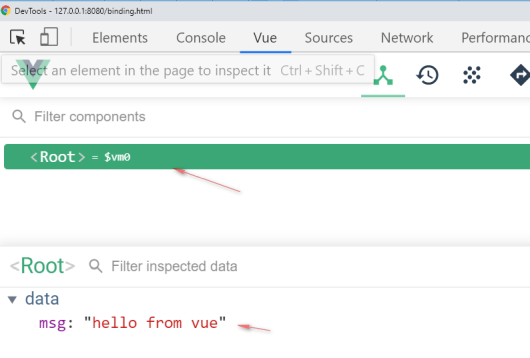
再在console终端卡里输入
1
| $vm0._data.msg = 'hello again'
|
<input />的 value即时显示为hello again
v-model: 双向绑定
而如果我们在<input />框里改变value,Message is: hello from vue却不会变化。要达到所谓的双向绑定(改变<input />的 value时vue实例的msg也跟着变化,就需要用到v-model。
editme.html:
1
2
3
4
| <div id="app"></div>
<script src="https://unpkg.com/vue/dist/vue.js"></script>
<script type="module" src="editme.js"></script>
|
editme.js:
1
2
3
4
5
6
7
8
9
10
11
| const templ = `
<div>
<input placeholder="edit me" v-model="msg" />
<p>Message is: {{ msg }}</p>
</div>
`
new Vue({
el: "#app",
data: { msg: "" },
template: templ
});
|
v-on 和 method
click-say-hello.html:
1
2
3
4
| <div id="app"></div>
<script src="https://unpkg.com/vue/dist/vue.js"></script>
<script type="module" src="click-say-hello.js"></script>
|
click-say-hello.js:
1
2
3
4
5
6
7
8
9
10
11
12
13
14
15
16
17
18
19
| new Vue({
el: "#app",
data() {
return {
msg: ""
};
},
methods: {
hello: function(evt) {
this.msg = "hellooo...";
}
},
template: `
<div>
<button v-on:click="hello">Say it</button>
<p>Saying: {{ msg }}</p>
</div>
`
});
|
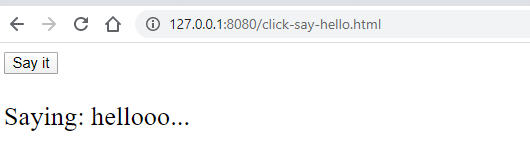
浏览器指向http://127.0.0.1:8080/click-say-hello.html, 点击Say it 后浏览器显示:
components: Vue.component
简单Component
compo1.html:
1
2
3
4
| <div id="app"></div>
<script src="https://unpkg.com/vue/dist/vue.js"></script>
<script type="module" src="compo1.js"></script>
|
compo1.js:
1
2
3
4
5
6
7
8
9
10
11
12
13
14
15
16
17
18
19
20
21
22
| const CompoOne = Vue.component("compo-one", {
data: function() {
return { compoMsg: "hello from compo-one" };
},
template: "<div>message from compo-one: {{ compoMsg }} </div>"
});
const templ = `
<div>
compo-one in #app: <compo-one></compo-one>
</div>
`;
new Vue({
el: "#app",
data() {
return {
msg: ""
};
},
components: { CompoOne },
template: templ
});
|
浏览器指向 http://127.0.0.1:8080/compo1.html显示
1
2
| compo-one in #app:
message from compo-one: hello from compo-one
|
SFC: Single File Component
将 compo1.js 里的 CompoOne 分离出来成为单独一个文件就成了所谓的 Single File Component 组件。
app1.html:
1
2
3
4
| <div id="app"></div>
<script src="https://unpkg.com/vue/dist/vue.js"></script>
<script type="module" src="app1.js"></script>
|
app1.js:
1
2
3
4
5
6
7
8
9
10
11
12
13
14
15
16
17
| import CompoOne from "./CompoOne.js";
const templ = `
<div>
compo-one in #app: <compo-one></compo-one>
</div>
`;
new Vue({
el: "#app",
data() {
return {
msg: ""
};
},
components: { CompoOne },
template: templ
});
|
CompoOne.js:
1
2
3
4
5
6
| export default {
data: function() {
return { compoMsg: "hello from compo-one" };
},
template: "<div>message from compo-one: {{ compoMsg }} </div>"
};
|
浏览器指向 http://127.0.0.1:8080/app1.html, 显示和上一个例子的输出相同
1
2
| compo-one in #app:
message from compo-one: hello from compo-one
|
题外话:CompoOne.js 转 CompoOne.vue
只需将 CompoOne.js 里的 template部分分离出来放在<template></template>里,再在其余部分加上 <script></script>,就可以转换成nodejs环境下用的组件。
CompoOne.vue:
1
2
3
4
5
6
7
8
9
10
| <template>
<div>message from compo-one: {{ compoMsg }}</div>
</template>
<script>
export default {
data: function() {
return { compoMsg: "hello from compo-one" };
}
};
</script>
|
例如,在 nodejs 环境下运行:
浏览器指向对应的端口(例如 http://localhost:8081/)显示message from compo-one: hello from compo-one。
props 组件传参
组件的意义在于可以传入不同的参数多次使用,props就是用来传参的。
传固定参数
app2.html:
1
2
3
4
| <div id="app"></div>
<script src="https://unpkg.com/vue/dist/vue.js"></script>
<script type="module" src="app2.js"></script>
|
app2.js:
1
2
3
4
5
6
7
8
9
10
11
12
13
14
15
16
17
18
19
| import CompoTwo from "./CompoTwo.js";
const templ = `
<div>
compo-two name="Alice": <compo-two name="Bob"></compo-two>
<br/>
compo-two: name="Bob" <compo-two name="Alice"></compo-two>
</div>
`;
new Vue({
el: "#app",
data() {
return {
msg: ""
};
},
components: { CompoTwo },
template: templ
});
|
CompoTwo.js:
1
2
3
4
5
6
7
| export default {
data: function() {
return { compoMsg: "hey " + this.name + " hello from compo-two" };
},
props: ['name'],
template: "<div>message from compo-two: {{ compoMsg }} to {{ name }} </div>"
};
|
浏览器指向 http://127.0.0.1:8080/app2.html, 显示
1
2
3
4
5
| compo-two name="Alice":
message from compo-two: hey Bob hello from compo-two to Bob
compo-two: name="Bob"
message from compo-two: hey Alice hello from compo-two to Alice
|
父组件传参
利用 v-bind 可以传入父组件的数据,从而可以获取用户的输入。
app3.html:
1
2
3
4
| <div id="app"></div>
<script src="https://unpkg.com/vue/dist/vue.js"></script>
<script type="module" src="app3.js"></script>
|
app3.js:
1
2
3
4
5
6
7
8
9
10
11
12
13
14
15
16
17
18
19
| import CompoThree from "./CompoThree.js";
const templ = `
<div>
<input placeholder="Type your name" v-model="msg" />
<br/>
<compo-three v-bind:name="msg"></compo-three>
</div>
`;
new Vue({
el: "#app",
data() {
return {
msg: ""
};
},
components: { CompoThree },
template: templ
});
|
CompoThree.js:
1
2
3
4
| export default {
props: ['name'],
template: "<div>Hello {{ name }}! </div>"
};
|
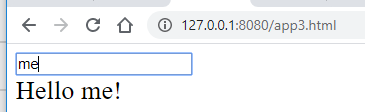
浏览器指向 http://127.0.0.1:8080/app3.html,在框里输入 me, 浏览器显示
computed 和 watch
前面的组件是在 template 里调用 props。如想在组件的data里调用则要利用 vue 的 computed 或 watch。例如,下面的做法并不能获取props的当前值。
app-foura.html:
1
2
3
4
| <div id="app"></div>
<script src="https://unpkg.com/vue/dist/vue.js"></script>
<script type="module" src="app4a.js"></script>
|
app-foura.js:
1
2
3
4
5
6
7
8
9
10
11
12
13
14
15
16
17
18
19
| import CompoFoura from "./CompoFoura.js";
const templ = `
<div>
<input placeholder="Type your name" v-model="msg" />
<br/>
<compo-foura v-bind:name="msg"></compo-foura>
</div>
`;
new Vue({
el: "#app",
data() {
return {
msg: ""
};
},
components: { CompoFoura },
template: templ
});
|
CompoFoura.js:
1
2
3
4
5
6
7
| export default {
data: function() {
return { compoMsg: this.name };
},
props: ["name"],
template: "<div>Hello {{ compoMsg }}! </div>"
};
|
浏览器指向 http://127.0.0.1:8080/app4a.html, 但用户输入时,compoMsg并无变化:
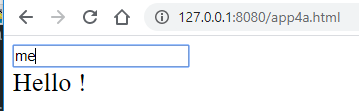
用户输入 me 时,浏览器只显示 Hello!,不显示 Hello me!。
组件 props 的使用
app-four.html:
1
2
3
4
| <div id="app"></div>
<script src="https://unpkg.com/vue/dist/vue.js"></script>
<script type="module" src="app4.js"></script>
|
app-four.js:
1
2
3
4
5
6
7
8
9
10
11
12
13
14
15
16
17
18
19
| import CompoFour from "./CompoFour.js";
const templ = `
<div>
<input placeholder="Type your name" v-model="msg" />
<br/>
<compo-four v-bind:name="msg"></compo-four>
</div>
`;
new Vue({
el: "#app",
data() {
return {
msg: ""
};
},
components: { CompoFour },
template: templ
});
|
CompoFour.js:
1
2
3
4
5
6
7
8
9
10
11
12
13
14
15
16
17
| export default {
data: function() {
return { compoMsg: this.name };
},
props: ["name"],
watch: {
name: function(newQuery, oldQuery) {
this.compoMsg = newQuery
}
},
computed: {
phraseFromParen: function() {
return this.name;
}
},
template: "<div>Hello {{ compoMsg }}/{{ phraseFromParen }}! </div>"
};
|
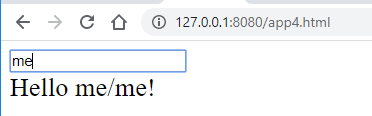
浏览器指向 http://127.0.0.1:8080/app4.html, 用户输入 me 时,compoMsg 和 phraseFromParen 随着变化(显示Hello me/me!):
组件实用 + v-html:基于 axios 的中英同义词接口
到这里已经可以写个小小的实用网页了,尽管界面简陋(有时间后面会用buefy框架整个漂亮一点的界面)。下面用到的接口是个利用爬虫给出中英同义词的接口。组件CompoAxiosGet.js 的 template 里用了 v-html。
axios-get.html:
1
2
3
4
| <div id="app"></div>
<script src="https://unpkg.com/vue/dist/vue.js"></script>
<script src="https://unpkg.com/axios/dist/axios.js"></script>
<script type="module" src="axios-get.js"></script>
|
axios-get.js:
1
2
3
4
5
6
7
8
9
10
11
12
13
14
15
16
17
18
19
| import CompoAxiosGet from "./CompoAxiosGet.js";
const templ = `
<div>
<input placeholder="Type a phrase" v-model="query" />
<br/>
<compo-axios-get v-bind:phrase="query"></compo-axios-get>
</div>
`;
new Vue({
el: "#app",
data() {
return {
query: ""
};
},
components: { CompoAxiosGet },
template: templ
});
|
CompoAxiosGet.js:
1
2
3
4
5
6
7
8
9
10
11
12
13
14
15
16
17
18
19
20
21
22
23
24
25
26
27
28
29
30
31
32
33
34
35
36
37
38
39
40
41
42
43
44
45
46
| const inst = axios.create({
baseURL: "http://173.82.240.230:1337/173.82.240.230",
timeout: 3000,
headers: {
UserAgent:
"Mozilla/5.0 (Macintosh; Intel Mac OS X 10_8_2) AppleWebKit/537.17 (KHTML, like Gecko) Chrome/24.0.1309.0 Safari/537.17"
}
});
export default {
data: function() {
return { result: this.phrase };
},
props: ["phrase"],
watch: {
phrase: function(newVal, oldVal) {
if (newVal == "") return "";
let serviceCode = "abc";
let query = newVal;
let params = new URLSearchParams();
params.append("query", query);
inst
.post(`/${serviceCode}`, params)
.then(resp => {
this.result = resp.data;
})
.catch(err => {
this.result = err.response;
});
}
},
computed: {
resultAlt: function() {
return this.phrase + (this.phrase ? ":" : "");
}
},
template: `
<div>
{{ resultAlt }} <br/> {{ result }}
<div v-html="result"></div>
</div>
`
};
|
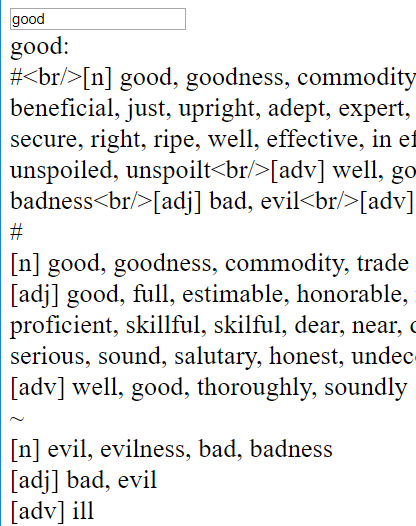
浏览器指向 http://127.0.0.1:8080/axios-get.html, 用户输入 good ,浏览器显示good的同义词和反义词。
整合 UI 框架Buefy
UI框架也可以整合进去。同时 html 文件也整得规范了一点。
buefy-search.html:
1
2
3
4
5
6
7
8
9
10
11
12
13
14
15
16
17
18
19
| <!DOCTYPE html>
<html>
<head>
<meta charset="utf-8" />
<meta name="viewport" content="width=device-width, initial-scale=1" />
<link rel="stylesheet" href="https://unpkg.com/buefy/dist/buefy.min.css" />
<link
rel="stylesheet"
href="https://cdn.materialdesignicons.com/2.5.94/css/materialdesignicons.min.css"
/>
</head>
<body>
<div id="app"></div>
<script src="https://unpkg.com/vue/dist/vue.js"></script>
<script src="https://unpkg.com/buefy/dist/buefy.min.js"></script>
<script src="https://unpkg.com/axios/dist/axios.js"></script>
<script type="module" src="buefy-search.js"></script>
</body>
</html>
|
buefy-search.js:
1
2
3
4
5
6
7
8
9
10
11
12
13
14
15
16
17
18
19
20
21
22
23
24
25
26
27
28
29
30
31
32
33
34
35
36
37
38
39
| import BuefySearchCompo from "./buefy-search-compo.js";
const templ = `
<div>
<!--input placeholder="Type a phrase" v-model="query" /-->
<section class="is-medium">
<div class="container">
<!--h3 class="subtitle">With Material Design Icons</h3-->
<b-field>
<b-input placeholder="Search..."
type="search"
icon="magnify"
icon-clickable
v-model="query"
@icon-click="searchIconClick">
</b-input>
</b-field>
<div class="card is-info has-text-primary is-family-primary has-text-weight-medium is-medium">
<buefy-search-compo v-bind:phrase="query"></buefy-search-compo>
</div>
</div>
</section>
</div>
`;
new Vue({
el: "#app",
data() {
return {
query: ""
};
},
components: { BuefySearchCompo },
template: templ,
methods: {
searchIconClick() {
alert("搜索栏输入中文或英文");
}
}
});
|
buefy-search-compo.js:
1
2
3
4
5
6
7
8
9
10
11
12
13
14
15
16
17
18
19
20
21
22
23
24
25
26
27
28
29
30
31
32
33
34
35
36
37
38
39
40
41
42
43
44
45
46
47
48
| const inst = axios.create({
baseURL: "http://173.82.240.230:1337/173.82.240.230",
timeout: 3000,
headers: {
UserAgent:
"Mozilla/5.0 (Macintosh; Intel Mac OS X 10_8_2) AppleWebKit/537.17 (KHTML, like Gecko) Chrome/24.0.1309.0 Safari/537.17"
}
});
export default {
data: function() {
return { result: this.phrase };
},
props: ["phrase"],
watch: {
phrase: function(newVal, oldVal) {
if (newVal == "") return "";
this.result = "diggin...";
let serviceCode = "abc";
let query = newVal;
let params = new URLSearchParams();
params.append("query", query);
inst
.post(`/${serviceCode}`, params)
.then(resp => {
this.result = resp.data;
})
.catch(err => {
this.result = err.response;
});
}
},
computed: {
resultAlt: function() {
return this.phrase + (this.phrase ? ":" : "");
}
},
template: `
<div>
<!--{{ phrase }}- --> {{ resultAlt }} <br/> {{ result == "diggin..." ? "": result }}
<div v-html="result"></div>
</div>
`
};
|
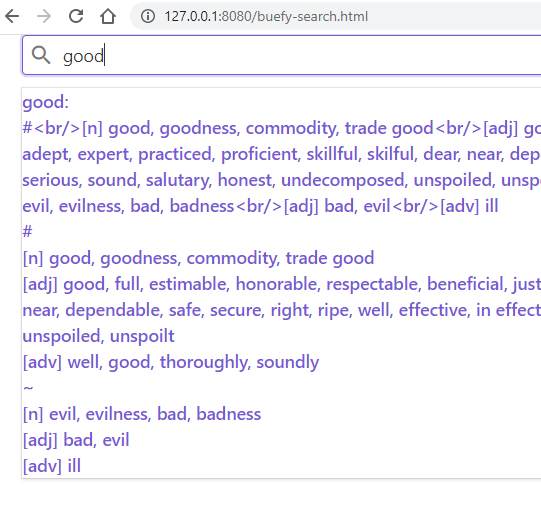
浏览器指向 http://127.0.0.1:8080/buefy-search.html, 用户输入 good ,浏览器显示 good 的同义词和反义词。
结语
算是自己的笔记,希望对想学习 vue 的网友有点用。有时间可能再把界面做得复杂点。